


Best Budget
0.00.00 Reviews
App Specs
- Version
- 2.1.4
- Updated On
- License
- Free
- Downloads
- 10,000+
- Developer
- CREXIN Technologies
- Categories
- Finance
- Platform
- Android
Screenshots
 Analysis by AppCompare
Managing money is difficult enough without an app making the process feel like another chore. I spent time looking at how Best Budget approaches everyday finance, especially from the point of view of someone who needs clear screens, simple navigation, and a routine that works even on a busy or tiring day. The app comes from CREXIN Technologies and sits in the finance category, with a straightforward purpose: helping me record spending, plan a budget, reduce debt, and work toward savings in one place.
That combination makes it more interesting than a basic expense notebook, but it also raises an important question: does putting several money tasks together make financial planning easier for different kinds of users, or does it create another complicated dashboard? My overall impression is that Best Budget is most appealing when I use it as a regular check-in tool rather than expecting it to replace every banking service. Its value depends heavily on how consistently I enter information and whether its presentation feels comfortable for my own reading and navigation habits.
How the app feels to read and navigate
I read this section as a guide to judging the app’s visual comfort, not just its general simplicity. When I try any budgeting tool, I check whether I can distinguish a planned amount from money already spent without slowing down to interpret the screen; that small test matters more than a tidy-looking layout. It also helps me decide which information deserves a place in my routine and which details I can leave out.
A focused starting point for money tasks
The strongest part of Best Budget’s concept is its focus. Instead of asking me to move between a bank app, a separate debt calculator, and a savings tracker, it brings the main personal-finance jobs into one financial workspace. That can reduce mental switching, particularly for someone who wants to open one app and immediately decide what needs attention.
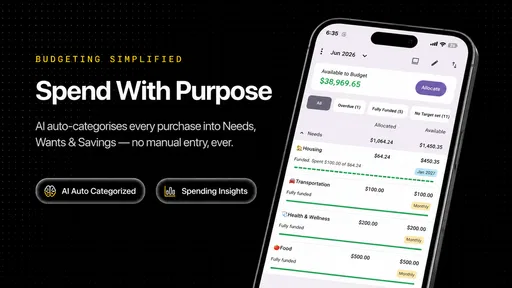
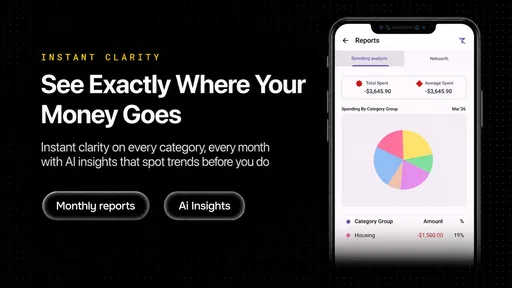
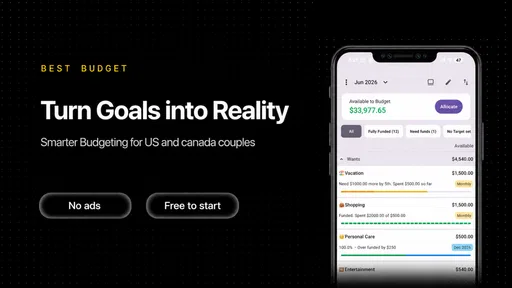
The store summary presents the app as a way to track spending, set budgets, tackle debt, and build savings. In practice, I would approach those areas as connected steps rather than unrelated tools. Spending records show where money is going; budgets turn that information into limits; debt planning gives priority to obligations; and savings goals provide a reason to protect the remaining amount. This sequence is easier to understand than treating every financial concern as a separate project.
I also like that the app is free to download. That lowers the barrier for someone who wants to test a budgeting routine before committing money to it. The app includes purchases ranging from six dollars to ninety-six dollars per item, so I would pay attention to any upgrade prompts and decide whether the extra value fits my needs before buying. For a cautious user, the sensible approach is to begin with the basic experience and only spend after identifying a specific limitation that an optional purchase would solve.
Readability matters more than a crowded feature list
Budgeting screens can become difficult when every figure is presented with equal visual importance. A user may need to distinguish available money, planned spending, debt, and savings without repeatedly decoding the interface. Best Budget is at its best when I can answer one question quickly: what should I do with my money next?
Worth Reading Before You Choose

EA SPORTS FC Mobile 26 Is a Bigger Football Game, but It Takes Time

Flipboard Shows What News Apps Must Do Beyond the Feed

Switching to Android Auto Means Rethinking Your Driving Routine

Google Calendar Makes a Crowded Week Easier to Manage

Ludo King Makes the Most of the Minutes Between Plans

Baby Panda World Brings Quick Play to Modern Phones, but Its Game Library Feels Busy
For readers with reduced vision, temporary eye strain, or difficulty processing dense layouts, a practical routine is to keep the number of active categories small. I would begin with broad groups such as housing, food, transport, bills, and personal spending instead of creating a separate category for every shop. Fewer categories make the figures easier to scan and reduce the chance of entering information in the wrong place.
There is also a useful distinction between visual simplicity and financial simplicity. A clean screen cannot fix a budget that is too complicated. I would therefore set up the app in stages: first record regular expenses, then add a few flexible categories, and only afterward introduce debt or savings targets. This staged setup is a concrete way to make the experience more manageable for someone who becomes overwhelmed by long forms or too many decisions at once.
Navigation for different attention patterns
Not everyone opens a finance app in the same state of mind. Some people review money calmly at a desk, while others enter a purchase quickly from a noisy bus, a shop queue, or the end of a long workday. Best Budget is more usable in those situations when I treat it as a short capture tool rather than attempting a full financial review every time.
My preferred workflow would be to record an expense as soon as possible, then reserve a quieter weekly session for checking categories and adjusting plans. This separates the quick motor task of entering a transaction from the more demanding thinking task of deciding whether the budget is realistic. It is a small change, but it prevents a rushed moment from turning into a long, frustrating session.
Users who rely on larger text, screen magnification, or strong contrast should judge the app directly on their device, because comfort depends on the operating system, display, and personal settings as well as the app itself. I would not assume that a finance app is accessible simply because its purpose is simple. The important test is whether labels, totals, controls, and warnings remain understandable after appearance settings are adjusted.
Using Best Budget in real situations
This section turns the budgeting idea into everyday choices, from payday planning to balancing debt payments with savings. I find it useful to consider what I would do when an unexpected cost appears, because a plan is only helpful if I can adjust it without losing sight of essentials. The examples also help clarify when a dedicated budgeting app makes sense and when a simpler notebook or spreadsheet may be the better fit.
A realistic payday routine
Imagine I receive my monthly income and want to avoid spending too freely during the first week. I would begin by entering fixed commitments, then reserve an amount for groceries, transport, and other predictable needs. After that, I would assign a modest amount to savings and identify the debt payment that must not be missed. The remaining flexible money becomes the amount I can use without pretending that every dollar is available.
The useful insight here is that a budget should be treated as a sequence of decisions, not just a collection of limits. If I enter a broad total but do not separate unavoidable commitments from flexible spending, the number may look healthy while hiding a problem. Best Budget is more helpful when I use its different financial aims together: spending records reveal the pattern, budgets create boundaries, debt planning protects priorities, and savings gives the plan a destination.
During the month, I would avoid constantly changing the plan after every small purchase. Instead, I would review whether a category is genuinely unrealistic or whether one unusual expense distorted the period. That distinction prevents overcorrection. A single expensive repair should not automatically cause me to abandon a carefully designed budget, while repeated overspending in the same category is a sign that the original limit needs revision.
Debt and savings require different kinds of attention
Debt reduction can feel discouraging because progress is often less visible than a new purchase. Savings can feel abstract when the goal is far away. Keeping both ideas inside the same app may help me see that they are competing priorities rather than isolated ambitions. Every amount directed toward one goal affects what is available for the other.
I would use the app to make that trade-off explicit. For example, if I increase a debt payment, I would also check whether I have left enough room for ordinary expenses. If I push savings too aggressively, I may end up withdrawing the money later or relying on credit. A smaller target that survives several months is more useful than an impressive target that forces me to reset the plan immediately.
One non-obvious benefit of this approach is emotional clarity. A budget is not only about arithmetic; it can show whether my expectations match my actual life. If the app repeatedly shows that debt payments and basic costs consume nearly everything, the answer may not be another tighter category limit. I may need to reduce a commitment, change a goal, or seek outside financial advice. Best Budget can organize the information, but it cannot make an unaffordable plan affordable.
Who benefits most from this approach
I see Best Budget fitting people who want a central place for everyday money planning and are willing to enter information regularly. It may suit a student learning to control discretionary spending, a household trying to coordinate savings with debt payments, or a worker who wants more structure than a bank balance provides.
It can also help someone who has tried a paper notebook but needs a more connected view of spending and goals. The move from paper to an app is worthwhile when the user wants to compare current behavior with a planned limit and keep debt or savings in the same routine. The key is not advanced financial knowledge; it is the willingness to maintain the record.
On the other hand, I would skip it if I want automatic banking intelligence, investment analysis, or a complete replacement for a bank account. A budgeting app and a banking app serve different purposes. Best Budget is about organizing decisions, not removing the need to check accounts, confirm transactions, or understand financial commitments elsewhere.
Motor, sensory, and situational considerations
Manual expense entry creates a practical accessibility question. Anyone with limited dexterity, tremors, repetitive strain, or difficulty using small touch targets may find frequent recording tiring. The most workable strategy is to enter fewer, more meaningful records rather than trying to create an elaborate financial diary. Broad categories and a scheduled review can reduce repeated tapping without destroying the usefulness of the budget.
Users with sensory sensitivities may prefer short sessions, reduced distractions, and a predictable order of tasks. I would open the app with one purpose in mind, such as recording purchases or checking a category, and leave detailed planning for a calmer moment. This is especially useful when financial information itself is stressful. A simple routine can make the app feel like a neutral tool instead of a source of constant alerts or self-criticism.
Situational access matters too. Someone may use the app in bright sunlight, low light, while wearing gloves, with one hand occupied, or while sharing a device with another person nearby. Those contexts can change how easy it is to read and operate any finance interface. I would avoid entering sensitive financial details in a public place and would complete longer reviews when I can concentrate and protect my privacy.
For people who need assistance from a partner, family member, or support worker, the app may be useful as a shared discussion point, but the financial roles should remain clear. One person can help review categories while the account holder makes the final decisions. That separation is important because accessibility support should improve control, not quietly transfer control to someone else.
Where the experience still has limits
The central weakness of any manual budgeting system is maintenance. If I forget several purchases, the totals become less trustworthy, and an inaccurate total can lead to poor decisions. Best Budget cannot provide meaningful guidance from incomplete input. The app is therefore less suitable for someone who strongly dislikes recording transactions or who expects a fully automatic experience.
There is also a risk of over-categorizing. Detailed labels may feel productive at first, but they increase the amount of work required and make the system harder to sustain. I would rather have five dependable categories than twenty categories that I abandon after a few days. This is particularly important for users with limited energy, attention difficulties, or a schedule that changes constantly.
The presence of in-app purchases is another point to consider. A free starting point is welcome, but users should distinguish between the cost of trying the app and the cost of making it part of a long-term routine. I would not purchase anything merely because a prompt appears during an emotionally difficult budgeting session. First I would identify the exact task I need, then decide whether paying improves that task enough to justify the expense.
Finally, an app cannot replace judgment in unusual financial situations. Irregular income, shared debts, tax obligations, emergency costs, or complicated household arrangements may require a spreadsheet, a specialist service, or professional advice alongside a budgeting tool. Best Budget can still be useful for organizing the everyday portion, but I would not use it as the sole basis for a high-stakes decision.
Device fit and practical expectations
The app supports devices running Android 8.0 or later, which makes compatibility an important part of the decision for anyone using an older phone or tablet. Its current version is 2.1.4, and it is marked for Everyone, so the intended audience is broad rather than limited to a specialist financial group. The age label does not, by itself, tell me whether every screen will be comfortable for every ability, so I would still test the actual interface on the device I plan to use.
CREXIN Technologies is the developer behind the app. It has passed the ten-thousand-install mark, which suggests that it has found an audience while remaining a relatively focused choice compared with the most familiar finance platforms. I would interpret that as a reason to evaluate the workflow personally rather than choosing it solely because it is widely known.
The free entry point makes a trial practical, especially for someone who wants to compare it with a notebook or a general spreadsheet. The comparison should focus on effort: how quickly can I record a purchase, understand the remaining plan, and review progress toward debt or savings? If a spreadsheet gives me more control and I am comfortable maintaining formulas, that may remain the better option. If I want a purpose-built routine with less setup, Best Budget is the more approachable experiment.
My inclusive verdict
Best Budget is a sensible choice for people who want one focused finance app for spending awareness, budgets, debt, and savings. I appreciate its potential to turn several intimidating money tasks into a repeatable routine, and I think its free starting point makes it easier to explore without an immediate commitment. Its strongest accessibility quality is not a special claim or a flashy feature; it is the possibility of keeping financial decisions in a single, understandable workflow.
Still, inclusion depends on honest expectations. Manual entry may be tiring for some users, dense financial information can be difficult to process, and in-app purchases deserve a deliberate decision. I would recommend starting with broad categories, using short capture sessions, reviewing the plan at a predictable time, and checking whether the display remains comfortable with the phone’s own text and contrast settings.
The best reason to try Best Budget is that it can make money decisions visible without demanding a complicated financial system. I would recommend it to someone ready to build a modest, consistent habit and to users who want debt and savings considered alongside daily spending. I would choose a different tool for automatic account analysis, advanced investing, or highly complex finances. For everyone else, it is worth testing as a calm planning companion—provided the routine remains simple enough to use on ordinary days, not only on motivated ones.
Pros
- Simple interface makes tracking spending quick and approachable.
- Useful for users who want a clear overview of daily expenses.
- Budget categories help organize purchases more effectively.
- Lightweight design should work well on many Android and iOS devices.
- Can encourage better saving habits through regular expense monitoring.
Cons
- May lack advanced investment or debt-management tools.
- Manual expense entry can become time-consuming for frequent transactions.
- Limited customization may not suit complex household budgets.
- Users may need to verify whether bank syncing is supported.
- Some useful features could be restricted to a paid version.
FAQs for Best Budget
What is Best Budget, and what can I use it for?
Best Budget is a personal finance app designed to help you organize income, expenses, budgets, and savings goals in one place. After reviewing its main functions, it appears most useful for users who want a clearer overview of everyday spending without relying on complicated spreadsheets. You can typically use it to categorize transactions, monitor budget limits, and identify areas where your spending may be reduced.
Is Best Budget suitable for beginners who have never used a budgeting app?
Yes, Best Budget is generally suitable for beginners because its purpose is straightforward: record your financial activity and compare it with the limits you set. The app is easier to use when categories are kept simple and updated regularly. New users may need a little time to configure income sources, recurring bills, and spending groups, but the basic budgeting process should not feel overwhelming.
Does Best Budget connect directly to my bank accounts?
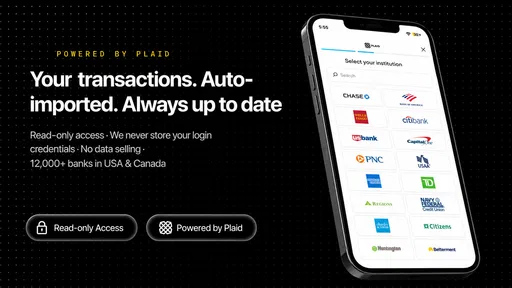
Whether Best Budget can connect to a bank depends on the version, region, and supported financial institutions. Users should check the app’s current description and permissions before downloading, especially if automatic transaction importing is important to them. If direct synchronization is unavailable, you may need to enter transactions manually, which offers more control but requires consistent updating.
Is my financial information safe when using Best Budget?
Before entering sensitive financial details, review Best Budget’s privacy policy, security information, and requested permissions. A budgeting app may handle personal spending data, so users should understand how information is stored, processed, and shared. Avoid entering banking passwords unless the app clearly explains a secure connection method, and keep your device protected with a screen lock and current operating system.
Is Best Budget free, or does it require a subscription?
Best Budget’s pricing can vary depending on the platform and the features included in the current release. Some versions may provide essential budgeting tools for free while reserving advanced reports, synchronization, customization, or an ad-free experience for paid users. Check the store listing carefully for in-app purchases, trial terms, and renewal conditions before downloading or starting a subscription.


